
Do I show up nearby?
That is the whole question, and for a plumber, a dentist or a cafe it is worth more than any other question on any other platform. Someone two suburbs away picks up their phone at eight in the evening and types "emergency plumber". Google shows them a small handful of businesses on a map, with star ratings and a call button. If you are one of them, the phone rings. If you are not, you never find out that the call happened at all.
Your Business Profile is the listing behind that moment. It is what appears in Google Maps and in the local results above the ordinary blue links, and for a local service business it is very often the single biggest source of calls, ahead of the website. What it is not is something you can buy: the local results are not an auction, and the only levers you have are a complete profile, genuine reviews and steady activity, which is slower than paying for a spot and considerably cheaper.
Your website is where people check you out. Your Business Profile is where they find you in the first place, and it is very often where they call from, without the website ever loading.
How the local results work
Three stages, and only the middle one is Google's. The first belongs to a customer with a problem, the third belongs to your listing, and the middle is the ranking decision that connects the two.
The customer
Someone searches nearby
types "plumber near me", or searches inside the Maps app
The ranking
Google picks the local results
relevance to the search, distance from the searcher, prominence from reviews and completeness
The listing
What they do next
call, request directions, visit the website, send a message
New custom
Discovery searches: someone searched for the service, the category or a landmark. They did not know your name, and Google introduced you.
Existing custom
Direct searches: someone typed your business name or address. They already knew you, and came to Google for your number or your hours.
That split along the bottom is the most useful thing on this page, and it is the part most people never look at. The two halves answer completely different questions. Discovery tells you whether your marketing is creating demand, because every one of those people was a stranger who is now looking at your photos. Direct tells you whether the demand you already had can find you, which is a question about signage, word of mouth and whether your hours are right, not about reach at all.
The three ranking factors are not equal levers. Distance you cannot change without moving. Relevance you change by naming your categories and services exactly, so that "emergency plumbing" is something your profile actually says. Prominence is the one that moves with effort, and it is mostly reviews and completeness.
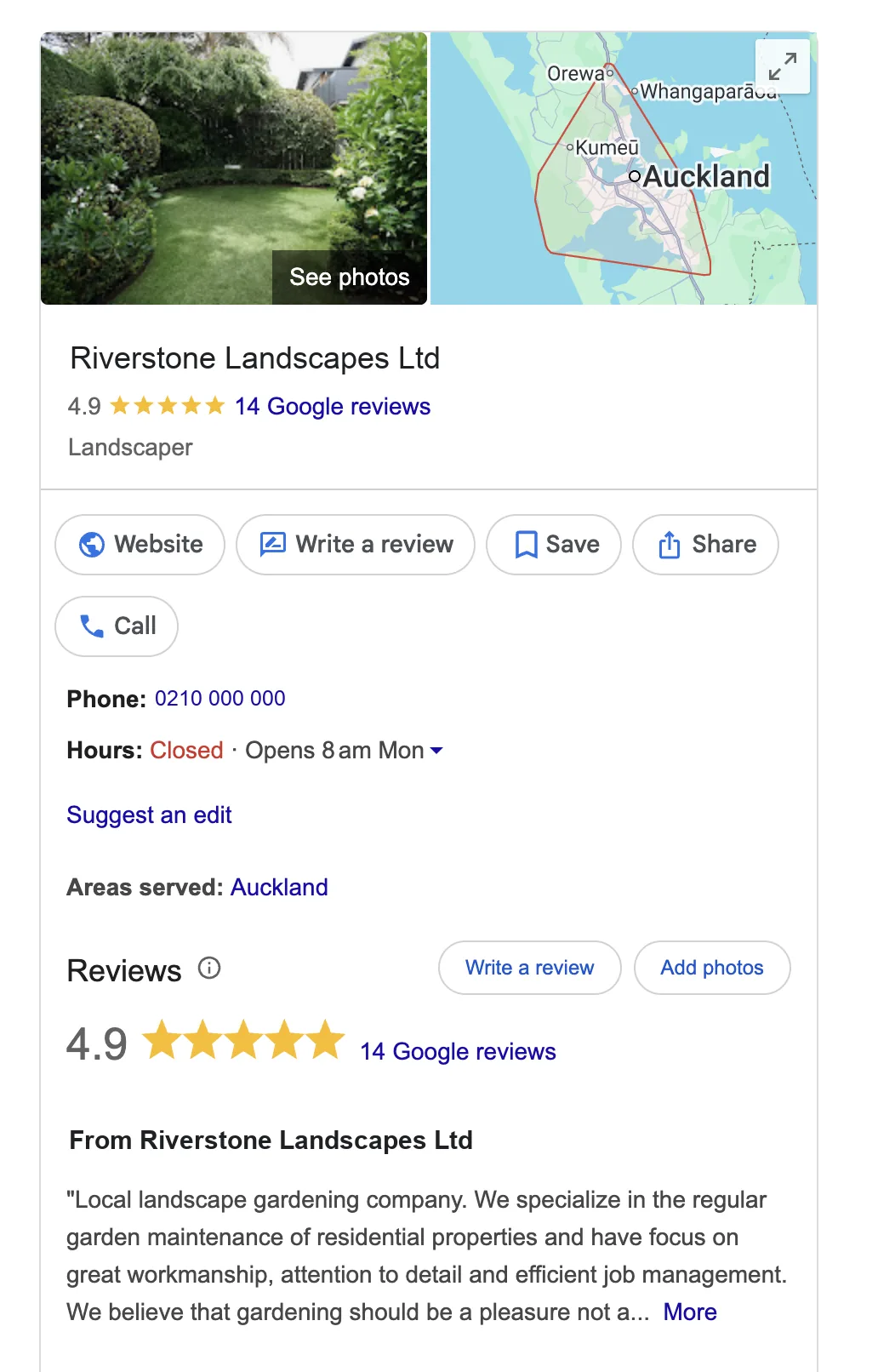
What a customer sees
This is the whole product
There is no website here and no advertising budget. A photo, a rating, a phone number, opening hours and the area served, and every one of those is a field you fill in once.
The buttons are what the numbers in the next section count. Call, Directions and Website are the actions; everything above them is the listing earning the right to be shown.
Google Search, September 2026. Names, account numbers and contact details are replaced with examples.
The four numbers worth reading
Business Profile has a Performance report, and it is short enough to read in a minute. It covers what happened on the listing itself, which means it stops at the moment somebody leaves for your website or picks up the phone. Four numbers carry almost all of it.
How many people saw my listing?
Views, split by where they happened. Maps views and Search views behave differently, so read them apart rather than added together.
1,240 views in a month, 780 of them on Maps and 460 in Search.Performance · OverviewDid they know my name already?
The discovery share against the direct share. This is the number that tells you whether your marketing is creating new demand or simply catching demand you already had.
61% discovery means most of the month's views came from people who did not know you.Performance · SearchesWhat did they do about it?
Actions: calls, direction requests, website clicks and messages. This is the closest thing on the platform to a customer.
173 actions from 1,240 views is 14 actions per 100 views.Performance · OverviewHow do I compare on trust?
Review count and average rating together. Quantity matters, recency matters more than people expect, and your replies are public, so the way you answer a bad one is part of the listing.
4.6 average from 87 reviews, with 9 of them in the last month.ReviewsRead the four as one sentence and you have the month: this many people saw us, this share of them were strangers, this many did something about it, and here is how we look when they check.
Views tell you Google is showing your listing. Actions tell you the listing is doing its job. They are different problems with different fixes.
Setting it up
Five steps. The first four are an afternoon of work and the fifth never really finishes, which is the point of it.
- 1Claim the profile and verify the business
Search for your business name on Google first, because a listing may already exist that someone else created. Claim it, then verify: usually a postcard to the address, sometimes a phone call, increasingly a short video of the premises and your tools. The form takes minutes, the verification itself takes days.
15 min, plus days - 2Complete every field, especially the exact ones
Primary and secondary categories, because they decide which searches you are eligible for at all. Service area, if you travel to customers. Opening hours including the holiday overrides, which is the field most often wrong and the one that costs a business a whole busy weekend.
30 min - 3Add real photos
The actual premises, the actual van, the actual team, and a few pieces of finished work. Stock images read as stock to customers and they do nothing for prominence. A dozen honest photos taken on a phone beat three polished ones of somebody else's kitchen.
20 min - 4Set up the action you actually want
Decide what a good outcome looks like and make that the easy thing to do: the call button for a trade, a booking link for a clinic, a quote form for a builder. Then check the number and the link on your own phone, because a wrong digit here is invisible and expensive.
10 min - 5Ask your next five happy customers for a review
Ask at the moment the job is done, with a short link, and ask five people rather than fifty. Then reply to every review you already have, the good ones briefly and the bad ones calmly. Both the asking and the replying are visible to the next customer reading the page.
Ongoing
Three things beginners misread
The wrong read
"We had 1,240 views last month, so 1,240 people were interested in us."
The right read
"Our listing appeared 1,240 times and 173 people did something about it. The other 1,067 scrolled past."
Misread one
Views are not customers
A view is your listing appearing on somebody's screen, usually alongside two or three competitors. The number that matters is actions, because an action is a person who chose you over the businesses either side of you.
This matters most when the two move apart. A profile with rising views and flat calls has a listing problem, not a visibility problem: Google is showing you plenty and people are picking someone else. That is nearly always photos, reviews or hours, and it is fixed on the profile rather than by trying to get seen more.
The wrong read
"Views are up 30% since the rebrand, so more people are finding us."
The right read
"Views are up 30% and discovery fell from 61% to 44%. More people are looking us up by name. Fewer strangers are finding us."
Misread two
Direct searches are not marketing success
Direct searches are people who already knew your name. They are worth having, they are usually your best customers, and they are not evidence that your reach is growing. A busy month of word of mouth, a radio spot or a sign on a van all push direct up without a single new person discovering you.
So read the share, not the total. If discovery falls while total views rise, the chart looks like growth and is not: you are being found by the people who could already find you. Discovery is the half that has to move for new custom to arrive.
The wrong read
"Analytics says Maps sent us 60 visits. The profile is a minor channel."
The right read
"The profile sent 60 visits and 118 phone calls. Analytics can only ever see the 60."
Misread three
A call from the listing never reaches Analytics
When someone taps the call button on your listing, the phone rings and the website is never involved. Nothing loads, no tag fires, and Google Analytics has no way of knowing it happened. The same is true of a direction request, which sends a customer to your door with no digital trace on your side at all.
A business that judges its profile by website traffic therefore undercounts it badly, often by more than half. The calls are counted in exactly one place, which is the Business Profile Performance report, and that is the reason to open it rather than assume the analytics view is the whole picture.
In Clearly
Google Business Profile is not connectable in Clearly yet. The connector is built and tested, and it is waiting on Google to approve our access: our first application was declined and we have resubmitted. Until that lands, the sources you can connect are Google Analytics, Search Console, Google Ads, Meta Ads, LinkedIn Ads, your Facebook and Instagram pages, and your own Google Sheets. Our integrations page states the current position for every source and is updated the day anything changes.
What it will show when it lands is the month on Google as a local business experiences it: views split between Maps and Search, the discovery share beside the direct share, and calls, direction requests and website clicks counted as the actions they are. Sitting in the same report as your website and your search traffic, it will answer whether the people finding you nearby are the same people arriving on the site, or whether the phone is quietly doing most of the work while the website takes the credit.
Business Profile cheat sheet
| Metric | What it is | How it is counted |
|---|---|---|
| Views | Times your listing was shown | Counted separately for Maps and for Search, so read the two apart rather than as one total |
| Discovery searches | Views from people searching the service or category | Google classifies the search, not the person. These are strangers, and the share is your reach |
| Direct searches | Views from people searching your name or address | Same classification, opposite meaning. Existing custom finding your number |
| Calls | Taps on the call button | Counted on the listing only. Never appears in Google Analytics, because the website is not involved |
| Direction requests | Requests for directions to your address | Counted on the listing. The strongest intent signal a profile produces for a premises business |
| Website clicks | Clicks through to your site | The one action your analytics can also see, which is why it is easy to overweight |
| Messages | Chats started from the listing | Only counted where messaging is switched on, and slow replies visibly hurt it |
| Reviews and rating | Review count and the average of the stars | Recency counts as well as the average, and your public replies are part of what a customer reads |
Common questions
Is Google Business Profile free?
Entirely. There is no listing fee, no cost per view and no cost per call, and there is nothing you can pay Google to rank higher in the local results. If somebody calls offering to buy you a better position on Maps, that is not a product Google sells. The only related paid product is a Google Ads campaign, which can place an ad above the local results but does not change the local results themselves.
Do I need a shopfront?
No. A business that travels to its customers, a mobile mechanic or an electrician working from home, can set itself up as a service-area business, hide the street address and list the suburbs or the radius it covers instead. You still verify at the real address, Google simply does not publish it. What you cannot do is list an address you do not operate from, which is the fastest route to a suspension.
How long does verification take?
It depends on the method. A phone call or an email can be immediate. A video, where you film the premises, your signage and your tools, is usually reviewed within a few days. A postcard is the slow one, commonly one to two weeks, and it can go astray, in which case you request another. Nothing about your profile is public until verification finishes, so do this first rather than last.
Why did my profile get suspended?
Almost always an address or a name problem: an address you do not staff, a virtual office, a name padded with keywords like "Smith Plumbing Auckland Emergency 24/7", or a sudden edit to several core fields at once. Fix the underlying detail so the profile matches reality, then appeal through the support form with evidence such as a utility bill or a photo of the signage. Appeals are usually decided in days, not hours.
How do I ask for reviews without breaking the rules?
You may ask. Asking every customer, in person or by a short link after the job, is entirely within Google's rules. What you may not do is incentivise, so no discount, no prize draw and no free coffee in exchange for a review, and you may not gate, which means asking how the job went first and only sending the happy ones to Google. Both are grounds for having reviews removed, and gating is the more common mistake because it feels sensible.
Where to go next
Open your Performance report and look at one thing first: the discovery share. If most of your views are direct, your listing is a phone book for people who already know you, and the fix is reach rather than polish. If discovery is healthy but actions are thin, the profile is being shown and passed over, and the fix is on the profile itself, starting with photos and the review count. Either answer is worth more than the total view count that sits at the top of the page.
The series
All nine Platform 101s, in setup order
What each platform does, what it costs, how to set it up, and what its numbers mean.